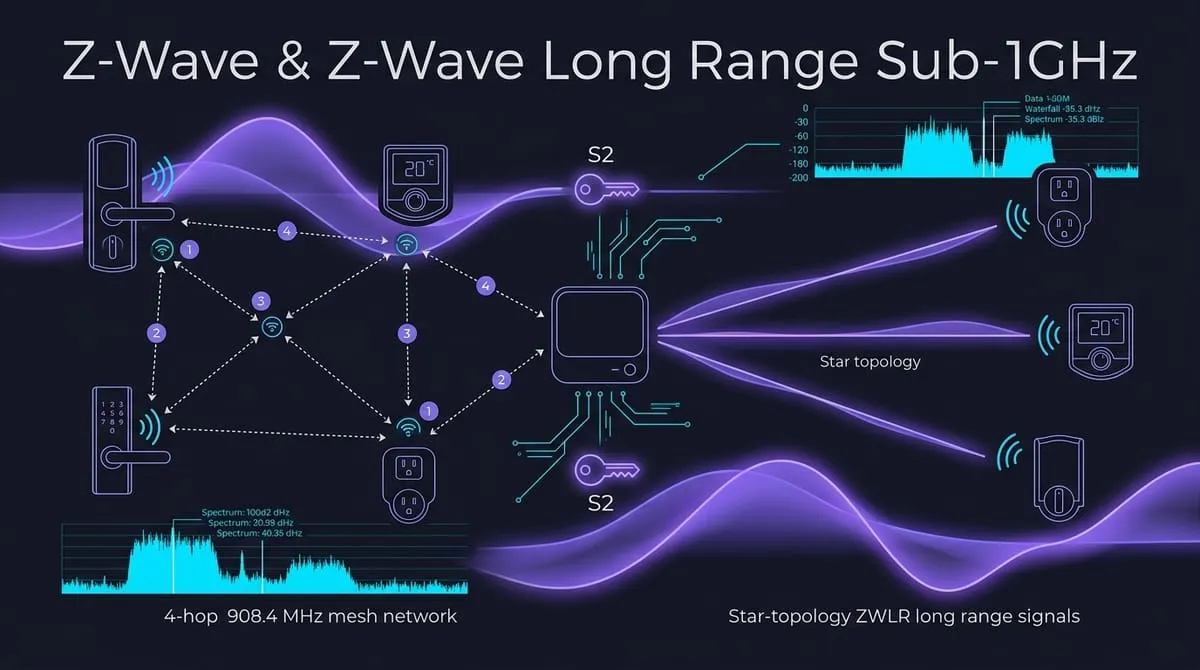
When builders encounter unreliable smart home setups in modern residential or commercial buildings, the culprit is almost always 2.4 GHz spectrum congestion. Wi-Fi access points, Bluetooth headphones, microwave ovens, baby monitors, Zigbee meshes, and Thread border routers all fight for the same narrow 83.5 MHz slice of microwave spectrum.
Z-Wave avoids this fight entirely by operating in the sub-gigahertz band (908.42 MHz and 916.0 MHz in the United States).
Standardized internationally as ITU-T G.9959, Z-Wave penetrates drywall, masonry, and subfloors with far less attenuation than 2.4 GHz signals. With the introduction of Z-Wave Long Range (ZWLR), the protocol expands beyond traditional 4-hop residential meshes into a high-capacity star topology capable of communicating up to a mile away at full line-of-sight.
01 · Classic Mesh vs. Z-Wave Long Range (ZWLR)
One of the most important architectural shifts in sub-1GHz automation is the transition from Classic Z-Wave Mesh to Z-Wave Long Range:
Classic Z-Wave (Source-Routed Mesh):[ Controller ] ──► [ Smart Plug ] ──► [ Wall Switch ] ──► [ Door Lock ]   - Max 4 Hops   - Max 232 Nodes per HomeID   - Shared Repeat Airtime
Z-Wave Long Range (Star Topology):[ Controller / Base ] ◄──────────────────────────────────► [ Outdoor Gate ] (~1 Mile) ▲ ├───────────────────────────────────────────────► [ Perimeter Sensor ] │ └───────────────────────────────────────────────► [ Mailbox Sensor ] - 0 Hops (Direct Link Only) - Up to 4,000 Nodes per Network - Dynamic Power Control (DPC)| Architectural Feature | Classic Z-Wave Mesh | Z-Wave Long Range (ZWLR) |
|---|---|---|
| Network Topology | Multi-hop Mesh (up to 4 hops) | Star Topology (Point-to-Multipoint) |
| Maximum Node Count | 232 nodes per HomeID | Up to 4,000 nodes |
| US Operating Frequencies | 908.42 MHz / 916.0 MHz | 912.0 MHz / 920.0 MHz |
| Data Modulation & Rates | 2-FSK / GFSK @ 9.6, 40, 100 kbps | GFSK @ 100 kbps |
| RF Transmit Power | Typically (1 mW) | Up to (or under §15.247) |
| Line-of-Sight Range | ~30–50 meters per hop | Up to 1.6 km (1.0 mile) |
ZWLR nodes do not repeat traffic for each other. Every ZWLR device talks directly to the central 700-series or 800-series controller. This eliminates mesh routing table overhead and latency while vastly expanding device capacity for multi-acre agricultural properties, commercial storage facilities, and sprawling estates.
02 · Node Classes: Listening, Sleeping, and FLiRS Door Locks
In Z-Wave networks, nodes are categorized by their radio listening behavior:
- Always Listening (Routing Slaves): Mains-powered devices (in-wall dimmers, smart outlets). Their receiver is permanently active, and they forward mesh traffic for neighboring nodes in Classic Mesh mode.
- Sleeping Slaves (Reporting Sensors): Battery-powered window/door contacts and flood sensors. The radio remains in deep sleep (< 2 µA) until an external reed switch or timer trips. It transmits its sensor report and returns immediately to sleep. You cannot send an asynchronous downlink to a sleeping slave.
- FLiRS (Frequently Listening Receiver Slaves): A specialized low-power mode designed for smart door locks and motorized valves.
How FLiRS Works
A smart deadbolt cannot afford to keep its receiver powered 24/7 (which would drain four AA batteries in two weeks), but it must respond within one second when a user taps “Unlock” on their smartphone.
- In FLiRS mode, the lock’s radio enters deep sleep, but wakes for roughly 1 millisecond every 250 ms or 1000 ms to listen for a high-frequency preamble tone.
- When the controller wants to unlock the door, it broadcasts a 1-second beam tone.
- The lock catches the beam during its millisecond wake window, remains awake, receives the encrypted command, throws the motorized deadbolt, and returns to sleep.
FLiRS beam transmissions monopolize local sub-1GHz airtime while active. If a battery door lock has a marginal link with high packet loss, the controller will repeatedly blast 1-second beams, temporarily delaying other sensor traffic. Always position an always-listening mains repeater within 15 feet of an S2 deadbolt to ensure pristine link margin.
03 · Security Architecture: Legacy S0 vs. Modern S2
Z-Wave security has undergone a radical evolution:
Legacy Security 0 (S0) — The Airtime Killer
Early Z-Wave security (S0) encrypted frames with a single network key. However, its handshake required three complete round-trip RF exchanges for every single encrypted command (Nonce Get, Nonce Report, Encrypted Payload, Ack). S0 caused massive channel airtime congestion, tripled latency, and rapidly depleted lock batteries.
Security 2 (S2) — Curve25519 and Single-Frame Speed
Modern 700 and 800-series devices use S2 Security, standardizing on:
- ECDH Key Exchange: Uses Curve25519 during inclusion to securely negotiate ephemeral keys.
- AES-128-CCM: Encrypts and authenticates payloads in a single packet transmission without pre-command nonce negotiation.
- Three Isolated Security Keys:
- S2 Unauthenticated: For low-security devices (colored bulbs, LED strips).
- S2 Authenticated: For sensors and switches; requires verifying a Device Specific Key (DSK) QR code to prevent man-in-the-middle attacks.
- S2 Access Control: A physically isolated key class reserved strictly for door locks, garage openers, and security alarm panels.
04 · Dynamic Power Control (DPC) in ZWLR
One of the standout engineering innovations in Z-Wave Long Range is Dynamic Power Control (DPC).
In standard sub-1GHz transmitters, the radio keys up at maximum configured power on every packet. If a node is positioned twenty feet from the controller, blasting full power wastes battery and creates unnecessary receiver desensitization.
With DPC enabled:
- The ZWLR controller measures the received Signal-to-Noise Ratio (SNR) and RSSI of the incoming node transmission.
- In the acknowledgment packet, the controller embeds a power-adjustment parameter.
- The remote node throttles its power amplifier down to the minimum output required to maintain a stable +10 dB link margin (often dropping from +14 dBm down to -6 dBm).
- If environmental conditions degrade (e.g., heavy rain or a parked vehicle blocking line-of-sight), the controller commands the node to ramp power back up automatically.
05 · FCC Part 15 Realities: Radiated vs. Conducted Rules
In the United States, Z-Wave devices operate under 47 CFR Part 15:
- Classic Z-Wave under §15.249: Classic mesh nodes typically operate under 47 CFR §15.249, which limits fundamental radiated field strength to 50 mV/m at 3 meters (equivalent to approximately -1.25 dBm / 0.75 mW EIRP).
- ZWLR under §15.247: Long Range implementations take advantage of 47 CFR §15.247 digital modulation and hybrid provisions. ZWLR modules operate at higher conducted power levels (typically +14 dBm / 25 mW, up to +30 dBm under specific certified equipment configurations).
- Zero 2.4 GHz Clashes: Because Z-Wave is centered around 908–920 MHz, it operates completely independent of Wi-Fi 6, Zigbee, Thread, or microwave ovens.
06 · Field Checklist: Building a Reliable Z-Wave System
- Deploy S2 Everywhere: Exclude legacy S0 devices or upgrade their firmware. Mixing S0 devices onto an S2 network drags down overall controller throughput due to legacy nonce polling.
- Scan DSK QR Codes: Use SmartStart QR code provisioning in Z-Wave JS. Powering on a pre-scanned device automatically joins it to the network with S2 Authenticated or Access Control keys without manual pairing sequences.
- Leverage ZWLR for Perimeter Nodes: If running an 800-series USB controller (Zooz 800 or Silicon Labs UZB7), enroll distant outdoor mailbox sensors and driveway gate monitors as Z-Wave Long Range devices to bypass intermediate repeaters.
- Maintain Local Control: Run your controller via an open-source driver like Z-Wave JS inside Home Assistant to guarantee that automation commands execute in under 20 milliseconds locally without internet latency.