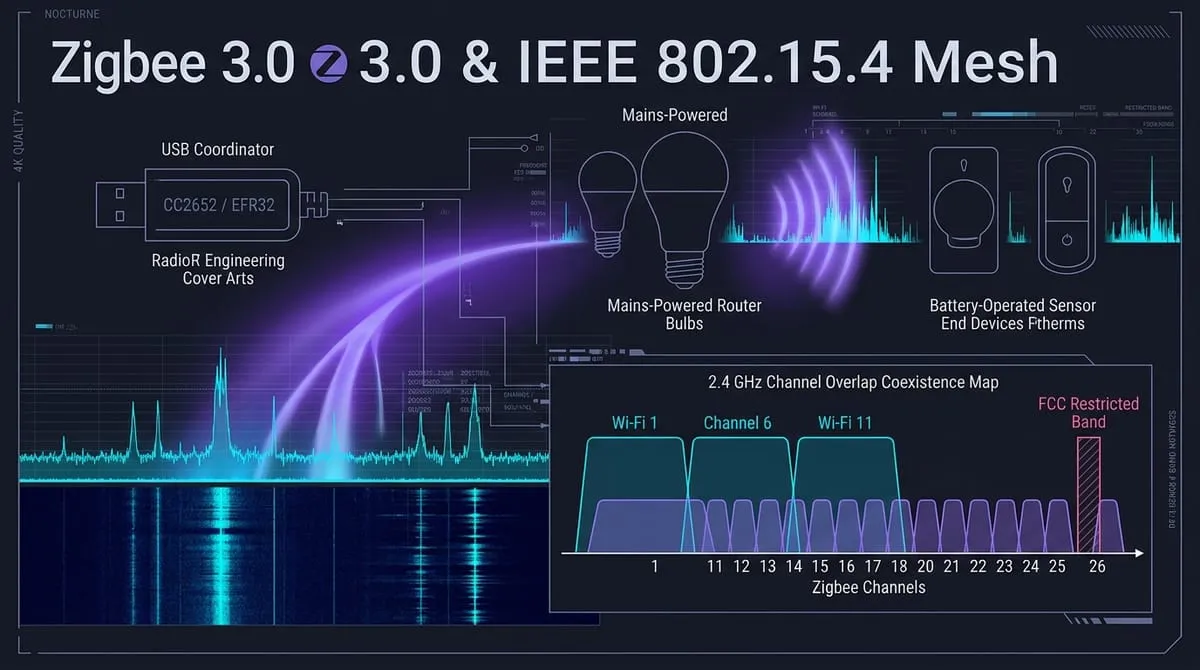
In smart home automation and commercial building control, Zigbee remains one of the most widely deployed low-power wireless mesh standards in the world. From Philips Hue bulbs and Ikea remotes to Aqara temperature sensors and custom homebrew CC2652 coordinators, millions of devices rely on Zigbee to move small commands reliably across living rooms and multi-story warehouses.
Yet many builders experience frustrating dropouts: battery sensors mysteriously fall off the network, light switches delay commands for three seconds, or routers lose pairing after a Wi-Fi channel change.
These issues are rarely hardware failures. They stem from misunderstandings of how IEEE 802.15.4 physical-layer framing, router parent-child relationships, and 2.4 GHz spectrum coexistence actually work.
01 · The Three Roles: Coordinator, Routers, and Sleepy End Devices
A Zigbee network (a Personal Area Network or PAN) is organized around three strictly defined device roles:
[ Zigbee Coordinator (Trust Center / USB Dongle) ] │ ┌─────────────┴─────────────┐ ▼ ▼[ Mains Router: Smart Plug ] [ Mains Router: Wall Switch ] │ │ ┌────┴────┐ ┌────┴────┐ ▼ ▼ ▼ ▼[ End Dev ] [ End Dev ] [ End Dev ] [ End Dev ](Door Sens) (Temp Probe) (PIR Motion)(Button)- Coordinator (ZC): Exactly one Coordinator exists per Zigbee PAN (often a USB radio adapter like a Sonoff ZBDongle-E or Silicon Labs EFR32 running ZHA or Zigbee2MQTT). The coordinator selects the operating radio channel, assigns the 16-bit Short PAN ID and 64-bit Extended PAN ID, and acts as the Trust Center managing security keys.
- Routers (ZR): Mains-powered devices (such as smart plugs, in-wall light switches, and dedicated relay repeaters). Routers listen continuously, forward mesh packets for neighboring devices, and maintain routing tables. Crucially, routers act as parents for battery-powered sensors.
- End Devices (ZED): Battery-powered edge devices (PIR motion detectors, door sensors, temperature probes). End devices never repeat mesh traffic. They spend 99.9% of their time in deep sleep. When they wake, they communicate exclusively with their designated parent router.
The Parent Table Trap: Every Zigbee router has a finite hardware RAM table limiting how many children (sleepy end devices) it can manage—typically between 8 and 32 devices depending on the SoC (CC2530 vs. CC2652P). If your coordinator or router child table is full, new battery sensors will fail to pair, even when standing two feet from the antenna. Adding more mains-powered smart plugs expands your network’s child capacity.
02 · The Physical Layer: IEEE 802.15.4 Channels and Timing
Zigbee 3.0’s primary radio layer is defined by IEEE 802.15.4 in the 2.4 GHz ISM band:
- Modulation: Offset Quadrature Phase Shift Keying (O-QPSK) with half-sine pulse shaping and Direct Sequence Spread Spectrum (DSSS).
- Chip Rate: 2.0 Mchips/s mapping 4 bits into a 32-chip pseudorandom noise sequence.
- Raw Data Rate: over the air.
- Channel Roster: 16 channels, numbered Channel 11 through Channel 26, spaced exactly 5 MHz apart:
| Zigbee Channel | Center Frequency () | Wi-Fi Coexistence Overlap |
|---|---|---|
| Channel 11 | 2405 MHz | Collides with Wi-Fi Channel 1 |
| Channel 12 | 2410 MHz | Collides with Wi-Fi Channel 1 |
| Channel 13 | 2415 MHz | Collides with Wi-Fi Channel 1 |
| Channel 14 | 2420 MHz | Overlaps upper skirt of Wi-Fi 1 |
| Channel 15 | 2425 MHz | Quiet Zone (Between Wi-Fi 1 & 6) |
| Channel 16 | 2430 MHz | Collides with Wi-Fi Channel 6 |
| Channel 17 | 2435 MHz | Collides with Wi-Fi Channel 6 |
| Channel 18 | 2440 MHz | Collides with Wi-Fi Channel 6 |
| Channel 19 | 2445 MHz | Collides with Wi-Fi Channel 6 |
| Channel 20 | 2450 MHz | Quiet Zone (Between Wi-Fi 6 & 11) |
| Channel 21 | 2455 MHz | Collides with Wi-Fi Channel 11 |
| Channel 22 | 2460 MHz | Collides with Wi-Fi Channel 11 |
| Channel 23 | 2465 MHz | Collides with Wi-Fi Channel 11 |
| Channel 24 | 2470 MHz | Collides with Wi-Fi Channel 11 |
| Channel 25 | 2475 MHz | Safe Zone (Above Wi-Fi Channel 11) |
| Channel 26 | 2480 MHz | Edge Channel (FCC Power Restriction!) |
03 · The 2.4 GHz Coexistence Battle: Wi-Fi vs. Zigbee
When a 20 MHz or 40 MHz Wi-Fi access point transmits at +20 dBm (100 mW), its wideband energy completely washes out the narrow 2 MHz, 0 dBm to +10 dBm (1 to 10 mW) signal of a nearby Zigbee node.
If your home Wi-Fi access point sits on Channel 1 and your Zigbee coordinator is configured on Channel 11, every video stream and smartphone download will cause massive Zigbee packet collisions and dropped commands.
The Golden Channels: 15, 20, and 25
To ensure reliable operation in environments with active Wi-Fi:
- If Wi-Fi uses Channels 1, 6, and 11, configure your Zigbee PAN on Channel 15, 20, or 25.
- Channel 25 is the industry favorite because it sits comfortably above Wi-Fi Channel 11’s upper band edge while maintaining standard transmitter power.
04 · The Channel 26 FCC Restricted Band Trap
Looking at the channel map, Channel 26 (centered at 2480 MHz) seems like the ultimate choice: it is furthest away from Wi-Fi 11. However, Channel 26 harbors a severe regulatory trap.
Under 47 CFR §15.205, the frequency band immediately above the 2.4 GHz ISM allocation—2483.5 to 2500 MHz—is a federally protected Restricted Band (allocated for radio astronomy, mobile satellite up/downlinks, and government radiolocation). Any spurious emissions spilling into this band must meet the extremely tight limits of 47 CFR §15.209 (500 µV/m at 3 meters, or roughly -41.2 dBm EIRP).
Because Channel 26 sits only 3.5 MHz away from the restricted band boundary, transceiver sidebands will easily blow past §15.209 limits if operated at full power.
The Real-World Consequence: To pass FCC certification, silicon vendors (Silicon Labs, TI, Nordic) program hardcoded power back-offs into their radio firmware for Channel 26. While a coordinator or smart bulb transmits at +10 dBm to +20 dBm on Channels 11–25, the moment it tunes to Channel 26, the firmware drops conducted output power down to 0 dBm or even -5 dBm.
Deploying your network on Channel 26 slashes link margin by 10 to 15 dB, resulting in poor range and flaky mesh connections. Stick to Channel 25 or Channel 20 instead.
05 · Multi-Layer Security: Network Keys vs. APS Link Keys
Zigbee 3.0 enforces 128-bit AES encryption using two distinct cryptographic layers:
- Network Key (Hop-by-Hop): A 128-bit symmetric key shared across every single device on the PAN. Every MAC frame transmitted over the air is encrypted with AES-CCM using the Network Key. Intermediate routers decrypt the packet header, inspect the 16-bit network address, verify the frame counter to prevent replay attacks, re-encrypt the frame, and forward it along the mesh.
- Application Support Sublayer (APS) Link Key (End-to-End): An optional second layer of AES-128 encryption between two specific endpoints (such as a door lock and the Coordinator Trust Center). Even if a compromised router decrypts the network layer, it cannot inspect the plaintext payload inside the APS envelope.
In modern Zigbee 3.0, devices join the network using install codes (a pre-shared 128-bit key printed as a QR code or barcode on the device housing), eliminating the legacy vulnerability where the Network Key was transmitted over the air encrypted with a default well-known key (ZigBeeAlliance09).
06 · Field Checklist: Building a Rock-Solid Zigbee Mesh
- Avoid Channel 26: Set your coordinator to Channel 25 (or Channel 15/20) to maintain full transmitter power while avoiding Wi-Fi 1/6/11 interference.
- Pair Devices in Place: Never pair battery sensors next to your PC and then carry them to the garage. Always put the sensor in pairing mode at its final permanent location so it selects the strongest local parent router.
- Establish Router Density First: Before adding dozens of battery sensors, deploy a dense backbone of mains-powered smart plugs or wall switches throughout your building.
- Use High-Quality USB Extensions: Never plug a 2.4 GHz Zigbee USB coordinator directly into a USB 3.0 port on a Raspberry Pi or mini-PC. USB 3.0 controllers emit broadband RF noise across 2.4–2.5 GHz that deafens coordinator receiver sensitivity. Always use a 3-foot shielded USB 2.0 extension cable.